A Simple Toolkit for Turning Phone Footage into Sharper Online Reports
Aug 17, 2026

VMPL
New Delhi [India], August 17: A reporter files a story from the field with 2 minutes of usable footage and twenty minutes until the deadline. The interview is solid. But the framing is shaky, and the clip needs to work on the website and three social feeds before the piece even goes live.
That gap between what a reporter captures and what actually gets published is where newsroom video quietly loses quality.
Not because the reporting is weak, but because there's rarely time for a second pass. The fix isn't a bigger production team. It's a toolkit: a small set of tools run the same way on every clip, so cleanup stops depending on how much time is left before the deadline.
Why Even Reporter-Captured Footage Needs Preparation
A reporter may capture the right moment, but the final footage still needs to work for the audience. It must fit the platform's vibe and publication's requirements. Some of these key factors include:
- Legal risk. Footage can capture bystanders or identifying details (faces or ID badges) that weren't the story's focus but become the outlet's liability once published.
- Field conditions vs. broadcast standards. Wind noise and low light are unavoidable in real reporting, but they still need cleanup before a clip is watchable.
- One clip, multiple shapes. The same footage has to work as 16:9 on broadcast, 9:16 on social media, and often square on the web--a shot framed for one can crop out the subject in another.
The goal is not to change what happened. It is to remove technical barriers so the reporting reaches viewers clearly.
Building a Workflow with Video Toolkit That Fits the News Workflow
Here's what the "deadline dilemma" looks like for a lot of newsrooms: the reporter finishes writing while the footage still needs editing, and there's rarely a dedicated editor free to polish every clip by hand.
A practical video toolkit with multiple features can help news teams clean footage. Vmake Labs, an AI video platform, can be used here: it covers most of these steps in one place. A few of its tools are especially relevant here:
- Removing watermarks from news footage. Reposted or screen-recorded clips often carry a stray logo in the corner. This makes the interview look amateurish. Vmake Labs' watermark remover strips these out automatically, so the footage that airs carries only the story.
- Sharpening soft or low-light footage. Phone-shot field footage often comes in soft or dim, and it shows more once blown up for broadcast or a web player. The AI enhancer upscales resolution and rebuilds lost detail. No reshoot or re-request needed.
- Cleaning up on-location audio. Wind, traffic, and room noise can bury a quote. Noise reduction tools clean up background sound so the source stays intelligible, without a separate audio pass.
- Reformatting footage for prime time slot and multiple platforms: A clip framed for the prime-time slot rarely survives the crop to 9:16 untouched. Reformatting tools move the same footage from broadcast to app to social feed without a separate edit each time.
Together, this toolkit covers most of the cleanup a clip needs before it's "ready to air". Now, let us understand how to use it.
The 4-Step Field-to-Publish Mobile Workflow
Step 1: Review and Organise the Footage
The first step is checking what was captured. Editors need to identify the strongest moments, confirm the footage supports the story, and look for any issues that need attention before publication.
This is also where teams can look into any privacy issues and anything that might affect the usage of the video.
Step 2: Improve Video Quality.
The next step is improving the elements that affect how viewers experience the report. Check for issues such as:
- Whether the footage is sharp enough for digital publishing
- Whether camera movement affects viewing
- Whether low light or compression has reduced important details
- Whether the subject remains clear throughout the clip
For news teams working on tight deadlines, manually fixing these issues across multiple clips can slow down publication. Automation can help speed up this process.
Tools such as Vmake Labs' video enhancer can help improve footage quality by enhancing clarity. It can help reduce visual issues and make mobile-recorded videos more suitable for online reporting without requiring lengthy manual edits. 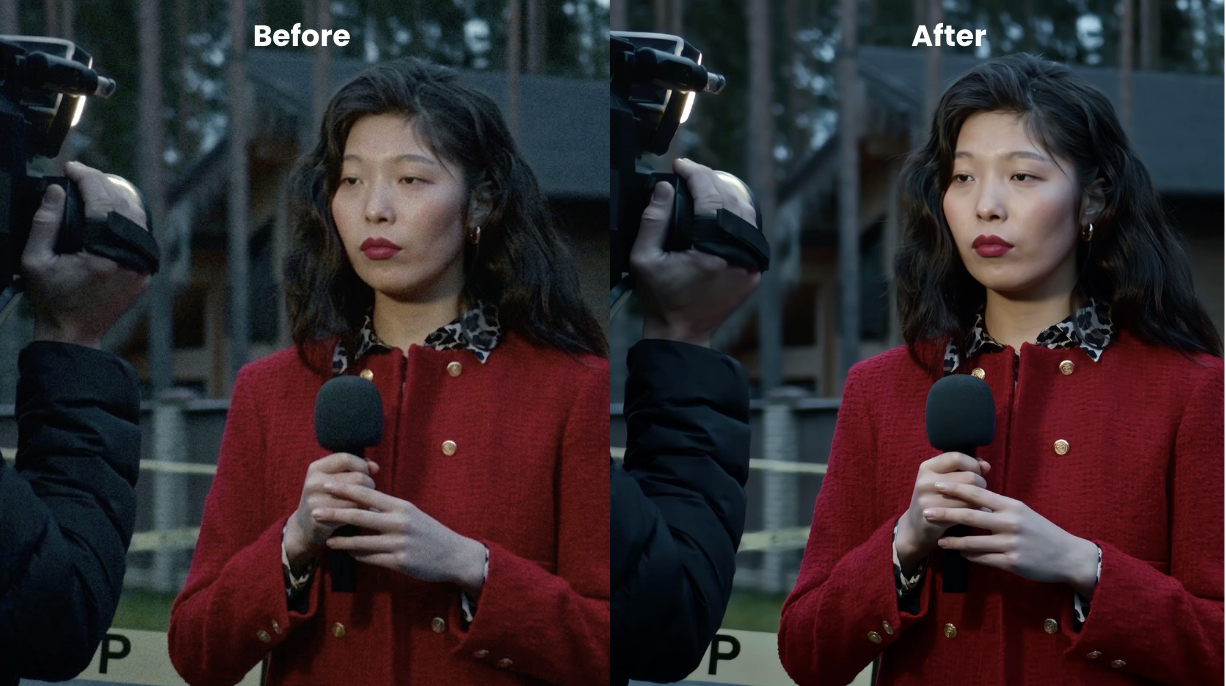
Step 3: Clean the Footage Before Publishing
After enhancing the video quality, the next stage is ensuring that the video is ready for clean publishing.
Begin by getting rid of anything that does not need to be there for the published footage, such as watermarks. This tends to distract from the main content.
For instance, while a journalist could have done an excellent job with their interview, a reuploaded video clip might retain the branding of another platform, distracting from the report. This makes it seem amateurish.
Instead of going through the trouble of doing it manually, editors can rely on automation, which is much quicker. The video watermark remover will remove the watermarks and overlays.
Step 4: Make Content Accessible.
Once the video has been edited and is ready visually, the next step would be to ensure that the audience is able to comprehend the story.
The first step towards doing this will be adding captions, which should be in line with the spoken information, should show up at the appropriate time, and should not overlap any crucial information in the video, particularly if the audience consuming the video does so via mobile devices and with no sound.
If the newsroom releases a number of videos daily, manual captioning could make the publishing of videos slower; hence, automated captioning can be used for generating captions.
For videos meant for broader audiences, translation can be useful in explaining interviews and explanations in the video and on the ground.
The Line Between Technical Enhancement and Editorial Alteration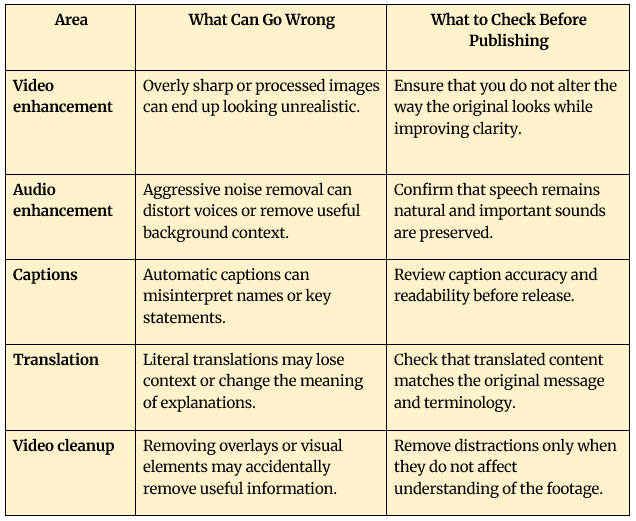
Looking Ahead
The challenge with field footage was never capturing the moment. Mobile devices have already made that easier. The harder part is turning inconsistent recordings into clear, publish-ready content without slowing down the workflow.
Automation can reduce the repetitive work behind enhancement and formatting. However, speed by itself is not the objective. The process must be fast because the resulting video needs to be accurate and comprehensible and faithful to the original.
The strength lies in stripping away the technical hurdles while leaving room for human decision-making. This combination enables the raw footage to move beyond mere documentation into communication of information.
(ADVERTORIAL DISCLAIMER: The above press release has been provided by VMPL. ANI will not be responsible in any way for the content of the same.)